Firewalls
What is a Firewall?

Firewalls are key pieces of network architecture designed to filter data and prevent attacks. Firewalls guard the entry point of a computer, also called a port. A Firewall is like a bouncer. It only lets trusted people, aka IPs, domains, etc, into the club, aka the computer. Internal firewalls guard different sections of this metaphorical club, making sure only certain people go backstage, upstairs, etc. Firewalls come in different varieties, hardware, and software. The most common type of firewall is a packet-filtering firewall. This type of firewall checks the packet’s source and destination and makes a decision as to whether it should be let through.
History
The first firewalls were developed in 1980 by the companies Cisco and DEC. They were called “Network Layer” and were very basic and easily bypassable. In the 1990s, a new generation of firewalls was invented. “Application Layer” firewalls were harder to set up, but they were more thorough and were better at filtering data. The firewalls we have today are a hybrid of these two types.
Security Risks
1. Outdated Software
Firewall providers often update their firewalls to combat new exploits and fix issues. By patching vulnerabilities the firewall can become more resilient against attacks. Advanced software from 2018 might not hold up in today’s world. If you aren’t proactive about updating your firewall, you may run the risk of a damaging breach or a DDoS.
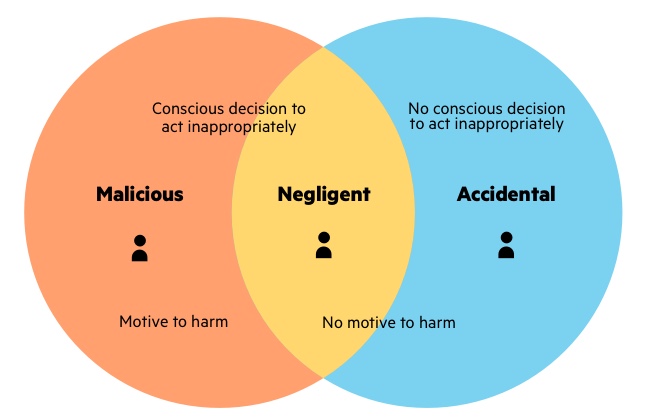
2. Internal Attacks
Firewalls cannot detect insider threats because firewalls focus on filtering external data, and cannot detect anything that has passed into the network. If a turncoat, mole, or careless employee allows data to bypass a firewall, then the network can be destroyed from the inside without ever touching a firewall.
3. Basic Inspection Protocols
If firewalls are set up quickly, they may only look at the sender and receiver of a packet, rather than the packet itself. Hackers can “spoof” network firewalls and make it seem like a packet is coming from somewhere it isn’t.
Proposed Solutions
Many of these problems can be fixed with proper protocol and maintenance. Basic maintenance can fix outdated software. A dedicated IT team or one passionate user can keep a firewall up to date. Newer firewall systems, called “next-gen” firewalls test the content of a packet by using layer 7 deep packet inspection. Insider attacks are the trickiest of the three. There are some basic practices you can use to mitigate insider threats.
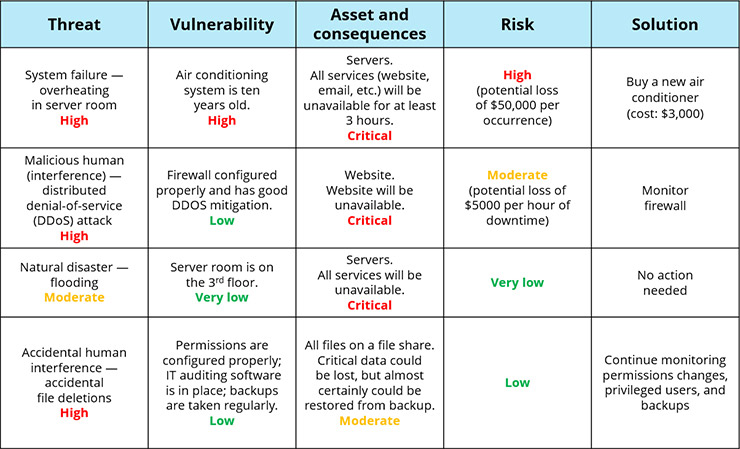
1. Perform Risk Assessments
Find what your riskiest assets are, their vulnerabilities, what the consequences of a breach would be, and then prioritize enhancing your security. It can be good to make a table out of your data. Here is an example:
2. Establish Physical Security
A good way to stop someone from getting inside your network and keeping them out of the physical spaces. A security team, cameras, or even just locks on server room dorms will keep unwanted agents away. Making sure to check people for unauthorized devices before going into a room with important IT devices can be a good step towards safety. All of this will, at least, help maintain a good security theater. Every day the TSA finds 11 guns in carry-on bags. The TSA spends 8.6 billion per year. That means it costs about 2,141,967 just to stop a single person from bringing a gun on a plane. So why does the US government continue paying for this security? Because it prevents countless people from trying to bring a gun on a plane. The idea of a security team can be scarier than the team itself.

3. Software
Certain products, such as Firewall Analyzer or Ekran System can be a good way to prevent an insider attack. These solutions can monitor and flag suspicious activity. These systems can record video conferences, monitor VPN usage, searches, and can detect USB devices. It’s very hard to stop an insider attack, because the user may have complete access to your systems, but with the correct software, you can be alerted before the attack ever happens, and prepare damage control, fire the perpetrator and protect your assets.

Conclusion:
In conclusion. Firewalls are great protection against outside threats like DDoS and XSS attacks. Many of their shortcomings can be mitigated by proper maintenance and usage. What they have in external security they lack in internal protection. Insider attacks can bypass firewalls but can be properly dealt with via software and proper regulation. Physical security and risk assessments can help against insider attacks. With new innovations in tech happening every day, hackers getting stronger, companies creating updating security technology, firewalls are here to stay, for now.
Sources:
https://www.checkpoint.com/cyber-hub/network-security/what-is-firewall/
https://www.forcepoint.com/cyber-edu/firewall
https://www.britannica.com/technology/firewall
https://www.trustnetinc.com/firewall-vulnerabilities/
https://www.netwrix.com/Insider_Threat_Prevention_Best_Practices.html
https://www.netwrix.com/information_security_risk_assessment_checklist.html
https://www.ekransystem.com/en/solutions/preventing-insider-threat

 The wave moves up and down over time as the sound changes and evolves, using this graph which we can detect with microphones, we can plot points on the graph represented in binary like this:
